Which clip-on macro lens fits your phone and how close it can focus

Most clip-on macro lenses use a universal spring clip that fits any phone with a case under 5mm thick. They magnify 10× to 25× and focus between 15mm and 40mm from the lens, depending on optical quality and element count.
On this page (8 sections)
- Remember this
- Which phones accept clip-on macro lenses
- What magnification and focus distance you actually get
- How the clip stays attached and when it slips
- Limitations compared to native macro modes and dedicated cameras
- Compatibility with major phone models and camera layouts
- Image quality issues and how to minimize them
- FAQ
Part of our guide on non-rotating mount for gym bar
Fast facts
- Typical magnification
- 10× to 25× optical
- Minimum focus distance
- 15mm to 40mm
- Case thickness limit
- under 5mm for spring clips
- Lens alignment tolerance
- within 1mm of camera center
- Glass elements
- 1 to 4, more is sharper
Remember this
- Spring clips fit phones with cases under 5mm; magnetic mounts need a MagSafe ring or compatible case
- Budget lenses focus around 40mm away with soft edges; multi-element glass gets sharp at 15-20mm
- Align the lens dead-center over your phone's primary camera, not the ultra-wide or telephoto
- Clean both lens surfaces with a microfiber cloth before each use to avoid haze
- Native macro modes on recent iPhones and Pixels outperform cheap clip-ons for sharpness
Which phones accept clip-on macro lenses
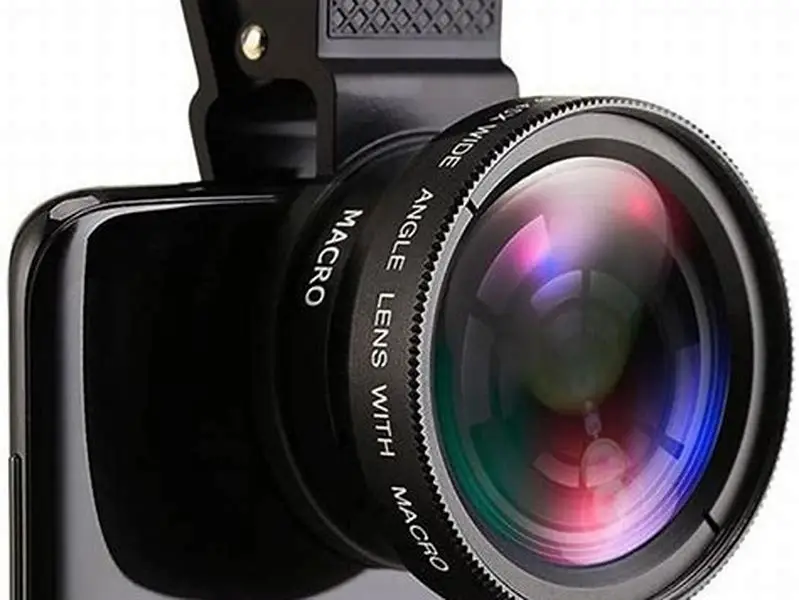
Spring-loaded clip mounts fit any smartphone with a case thickness under 5mm. The clip jaws open to around 12mm total, which covers the phone body plus a slim or medium case. Measure your case at its thickest point, usually near the camera bump. A case that sits 3mm proud of the back glass leaves roughly 2mm margin before the clip loses grip.
Magnetic mounts demand a MagSafe ring or a Qi2-compatible case with the magnet array built in. iPhones from the 12 onward have MagSafe magnets; Android phones need an adhesive ring or a case with embedded magnets. The lens snaps onto the ring and self-centers over the camera. That precision matters because macro lenses tolerate less than 1mm of misalignment before vignetting appears.
Thick cases with raised edges around the camera island block the clip or push the lens too far from the sensor. Otterbox Defender and similar rugged cases often sit 6-8mm thick, which exceeds the clip's range. You'll need to remove the case or switch to a slimmer one. Some clip lenses include a spacer ring to clear minor bumps, but it introduces another air gap that degrades sharpness.
The clip must align with the primary wide camera, not the ultra-wide or telephoto. On iPhones, that's the lens closest to the flash or the middle lens on a three-camera array. On Samsung Galaxy phones, it's usually the top lens. Clipping over the wrong camera either produces no image or distorts it beyond use. Check your camera app to confirm which lens is active before attaching the clip. The other half of this decision is hot shoe adapter tripod for bench press.
What magnification and focus distance you actually get
Clip-on macro lenses claim magnifications between 10× and 25×, but those figures assume perfect alignment and a reference distance the manufacturer never states. In practice, a $12 single-element lens delivers around 10× at 40mm working distance, while a $35 multi-element design hits 20× at 15-20mm. Working distance is the gap between the front of the lens and the subject, not the sensor plane.
Cheaper lenses use a single plastic element that magnifies by shortening the focal length. You hold the phone 30-40mm from the subject to lock focus. That distance makes lighting difficult because your phone casts a shadow. Multi-element lenses with three or four glass elements bring the focus distance down to 15-20mm and reduce chromatic aberration, the color fringing that shows up at high-contrast edges.
Magnification depends on the sensor size and native focal length of your phone's camera. A clip-on lens that delivers 15× on an iPhone 15 Pro might yield 18× on a Pixel 8 because the Pixel's primary sensor is larger. The lens doesn't change; the effective magnification does. Test it by photographing a ruler at minimum focus distance and counting how many millimeters fill the frame width. Before you commit to anything, it is worth looking at best lens for olympic bar filming.
Focus is entirely manual. You move the phone closer or farther until the subject sharpens on screen. There's no autofocus override because the lens sits outside the phone's control loop. The depth of field at 20× magnification is around 1-2mm, so any hand tremor throws the shot out of focus. Brace your phone against a stable surface or use a tripod mount.
| Construction | Elements | Focus distance | Magnification | Edge sharpness |
|---|---|---|---|---|
| Single plastic | 1 | 30-40mm | 8-12× | Soft, fringing |
| Two-element glass | 2 | 20-30mm | 12-18× | Acceptable center |
| Multi-element glass | 3-4 | 15-20mm | 18-25× | Sharp across frame |

Xenvo Pro Lens Kit for iPhone and Android
No data on number of glass elements or focus distance published
How the clip stays attached and when it slips
Spring clips rely on constant pressure from a steel or phosphor-bronze spring. The jaw pads are rubber or silicone to grip the case without scratching. A fresh clip holds firmly on a clean case, but oil from your hands, lint, or case texture reduces friction. Wipe both the clip pads and the case back with a dry cloth before attaching the lens.
The clip's center of mass sits forward of the attachment point, so the lens wants to tip downward. Holding the phone vertically puts the full weight on the spring. Holding it horizontally balances the load but increases the chance of the lens rotating if you press the screen. A 15-gram lens on a 200-gram phone shifts the balance enough that you notice it when shooting one-handed. People in this spot often ask about motorcycle phone mount for Xiaomi as well.
Magnetic mounts lock more reliably because the magnet array provides both grip and alignment. A properly placed MagSafe ring exerts around 15-20 Newtons of pull, which holds the lens flat against the case even when inverted. The downside is that you must stick the ring precisely over the camera or accept permanent misalignment. Peel-and-stick rings leave adhesive residue if removed.
Clip tension weakens after 50-100 attachment cycles. The spring fatigues and the rubber pads compress. A loose clip lets the lens drift off-center during shooting, which introduces vignetting at the frame corners. Replace the clip when you can slide it side-to-side with light finger pressure.
The clip fits almost any phone, but the focus distance and sharpness vary wildly between $8 and $40 lenses.
Limitations compared to native macro modes and dedicated cameras
Native macro modes on the iPhone 13 Pro and later, Pixel 7 and 8, and Galaxy S23 Ultra focus as close as 2-3cm with the ultra-wide camera and apply computational sharpening. Image quality from these native modes exceeds what a $20 clip-on delivers because the phone's processor corrects distortion, aligns multiple frames, and sharpens selectively. A clip-on lens bypasses all of that and gives you raw optical output.
Clip-on lenses add two air-glass interfaces where reflections and flare occur. Anti-reflective coatings on budget lenses are thin or absent, so shooting toward a light source produces ghosting. Multi-coated glass on $30-40 lenses reduces flare but never eliminates it. Native camera systems keep all elements inside a sealed barrel with baffles and coatings tuned to the sensor.
Dedicated macro lenses for mirrorless cameras focus closer and offer magnifications from 0.5× to 5× life-size with controlled depth of field and manual focus rings. A Canon RF 100mm Macro or Nikon Z MC 105mm costs $800-1000 but resolves detail that no phone sensor can capture, even with a clip-on lens. The phone sensor's pixel pitch and lens aperture limit resolution long before the clip-on lens does.
Clip-on lenses work best for quick macro shots where you already have your phone. Inspecting a circuit board solder joint, photographing a bug on a leaf, or checking a watch movement's jewels are all tasks where a $25 lens beats carrying a mirrorless body. For planned macro photography where sharpness matters, the native phone mode or a real camera wins.
Compatibility with major phone models and camera layouts
iPhones from the 12 onward have a vertical or triangular camera array with the primary wide lens either on top or in the middle. Clip the lens over the top-left camera on iPhone 12-14 standard models, or the middle lens on Pro models with three cameras. The lens must sit within 0.5mm of center to avoid vignetting. MagSafe-compatible clip lenses self-align, which removes the guesswork.
Samsung Galaxy S21, S22, S23 and S24 phones have a vertical strip camera module with the primary lens at the top. The ultra-wide sits below it, and the telephoto or depth sensor at the bottom. Clip-on lenses fit over the top lens. The module sits flush or slightly raised, so case thickness matters more than the module height. Cases thicker than 4mm push the clip's jaw past its travel limit.
Google Pixel 6, 7, 8 and 9 phones use a horizontal camera bar. The primary wide lens is on the left, ultra-wide on the right. Clip the lens over the left camera. The bar's raised profile creates a gap between the case back and the clip, but the spring usually compensates. Test the fit before assuming it works; some third-party cases with thick bar cutouts prevent the clip from seating flat.
Older iPhones with a single or dual-lens layout (iPhone 7-11) have the primary lens in the top-left corner. Clips fit without issue. Android phones with centered single-camera layouts, like budget Motorola or Nokia models, are easiest to align because there's no adjacent lens to confuse. The challenge is that budget phones often lack the processing power to save high-resolution macro shots quickly, so burst shooting fills the buffer.
- iPhone 12-16 standard: clip over top-left lens; Pro models: middle lens
- Samsung Galaxy S series: top lens in vertical strip module
- Google Pixel 6-9: left lens in horizontal camera bar
- OnePlus, Xiaomi flagships: primary lens usually top-left or center
Image quality issues and how to minimize them
Chromatic aberration appears as green or purple fringing along high-contrast edges. Single-element lenses suffer worst because they don't correct for dispersion. Multi-element designs with achromatic doublets reduce fringing to barely visible levels. Shoot in even lighting to minimize contrast, or desaturate the fringe colors in post if the subject allows it.
Vignetting darkens the frame corners when the lens misaligns by more than 1mm. The phone's sensor captures the edge of the lens barrel instead of the full image circle. Magnetic mounts prevent this; spring clips require you to check alignment in the viewfinder before every shot. A faint shadow in one corner means the clip has rotated slightly. Detach and reattach it.
Dust and fingerprints on either lens surface scatter light and reduce contrast. The rear element of the clip-on lens sits a few millimeters from your phone's camera glass, and any particle between them shows up as a blur spot. Clean both surfaces with a microfiber cloth before attaching the lens. Carry the lens in a small pouch to keep the glass clean between uses.
Flare and ghosting occur when shooting toward a bright light source. The air gap between the phone's lens and the clip-on introduces reflections that the phone's software can't suppress. Multi-coated glass helps, but the best fix is to reposition yourself so the light source is behind you or at a steep angle. A lens hood doesn't fit on a clip-on, so lighting discipline is the only control you have.
FAQ
Do clip-on macro lenses work with phone cases?
Spring clips fit cases up to 5mm thick, which covers most slim and medium cases. Thick rugged cases like Otterbox Defender exceed the clip's jaw range and must be removed. Magnetic lenses need a MagSafe ring or compatible case with embedded magnets.
Can I use a clip-on lens with my phone's native macro mode?
No. Native macro modes use the ultra-wide camera with software focus stacking. Clip-on lenses attach to the primary camera and bypass the phone's computational photography. Use one or the other, not both.
How do I know which camera lens to clip it onto?
Open your camera app and confirm which lens is active at 1× zoom. That's the primary wide camera. Clip the macro lens over it, not the ultra-wide or telephoto. On iPhones it's usually top-left or middle; on Samsung and Pixel phones it's the top or left lens.
Why are my macro photos blurry at the edges?
Either the clip-on lens is misaligned by more than 1mm, or it's a single-element design with poor edge correction. Check alignment first. If the lens is centered and edges are still soft, you need a multi-element lens with better optics.
Do more expensive clip-on lenses focus closer?
Yes, usually. Multi-element lenses with three or four glass elements focus at 15-20mm, while budget single-element plastic lenses need 30-40mm working distance. Closer focus makes lighting easier and increases effective magnification.