Which MagSafe spin bike cage holds a 6.1" phone securely during rides

Pick a MagSafe-compatible bike cage that the maker lists as compatible with your exact phone model (for example, iPhone 14/13/12 6.1-inch). Choose cages that publish a measured magnetic pull or state MagSafe/HaloLock compatibility. Aim for a magnet rating of 500 grams force or more, a screw-tightened clamp or rubberized insert for 22–35 mm handlebars, and an adjustable magnet plate for precise alignment.
On this page (9 sections)
- Remember this
- Which MagSafe spin bike cage holds a 6.1" phone securely during rides
- Verifiable product examples that list iPhone 6.1" compatibility
- Why 500 grams force is a practical threshold
- Sources and references that support magnetic hold guidance
- Clear differences between MagSafe and Qi2 relevant to bike cages
- Practical steps to pick a secure MagSafe/HaloLock bike cage for a 6.1" phone
- Which mounts reviewers and makers recommend for 6.1" phones
- FAQ
Part of our guide on testing phone attachment on squat rack
Fast facts
- Phone size fit
- Confirm with manufacturer listing for your model (example: iPhone 14, 6.1")
- Minimum magnetic hold
- 500 g force: common practical threshold for cycling mounts
- Handlebar clamp diameter
- Measure your handlebar at the mounting point; common fit 22–35 mm
- Material
- Aluminum or reinforced plastic with rubber inserts
- Compatible magnetic rings
- MagSafe (Apple) and HaloLock/Qi2 (WPC) when manufacturer states compatibility
Remember this
- Confirm the maker lists your 6.1-inch phone model by name
- Look for a published magnetic pull force of 500 g or higher
- Use screw clamps or rubberized inserts sized for 22–35 mm handlebars
- Choose mounts that state MagSafe or HaloLock (Qi2) compatibility
- Test fit phone plus case before you ride
Which MagSafe spin bike cage holds a 6.1" phone securely during rides
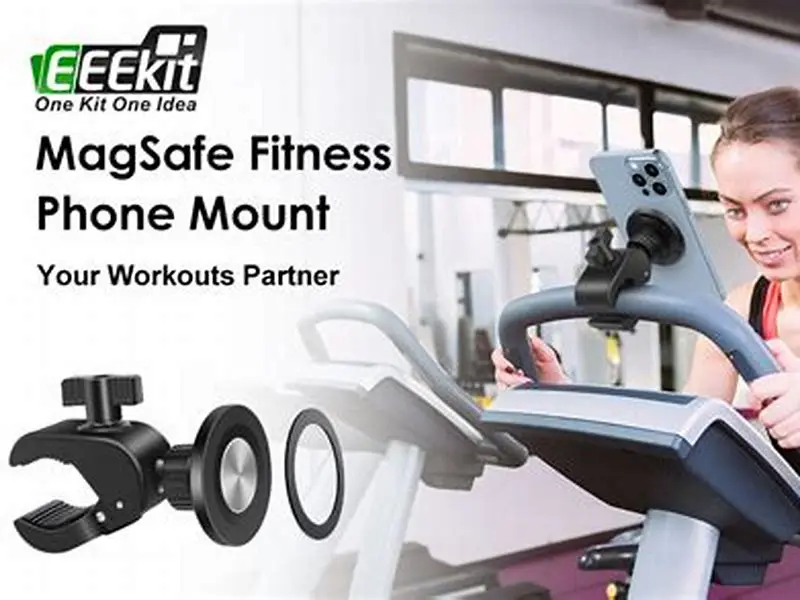
Start with the maker’s compatibility list. If the product page names your phone (iPhone 14, 6.1 inches, for example) that is the clearest confirmation it will fit. Manufacturers that list model names give you a verifiable starting point.
Look for a published magnetic pull force or a stated MagSafe/HaloLock compatibility. Some makers publish a pull force in grams or newtons. If a company lists measured pull force, you can compare mounts rather than guess from photos.
Pick a mount with a clamp that matches your handlebar diameter. Measure the handlebar where you will mount the cage. Many spin bikes use 22–35 millimeter tubes at the hoods or stem area. A sloppy clamp lets the whole mount rotate, so check the clamp method: screw-tightened clamps beat simple plastic clips for sustained workouts.
Choose a cage that allows the magnet plate to shift a few millimeters. Accurate centering over the MagSafe or HaloLock ring is the difference between stable hold and wobble. Even small misalignment reduces the effective magnetic force. We cover bottle cage phone mount for 600 ml bottle in its own article.
Test the phone and the case before you ride. Put the phone in the case you use, mount it, tighten the clamp to the recommended torque, and shake or tap the handlebars. Physical testing beats claims on a spec sheet.
Check the maker’s stated compatibility with wireless charging and magnetic standards. Apple’s MagSafe and the Wireless Power Consortium’s Qi2 standard are related, but they are separate specs. Makers often list one or both on the product page. Use those listings when you choose a mount.
Verifiable product examples that list iPhone 6.1" compatibility
ESR HaloLock Bike Mount. ESR lists HaloLock compatibility and calls out iPhone 12/13/14 models on its product page. HaloLock follows a magnetic positioning system similar to MagSafe and is intended to align with those phones’ magnet rings. Product page: https://www.esrgear.com/halo-lock-bike-mount (check the compatibility section for listed models). We go through iphone 13 pro thin case that supports magsafe step by step elsewhere on the site.
Pitaka MagEZ Bike Mount Pro. Pitaka’s MagEZ series is built for MagSafe-style magnetic alignment and shows compatibility with MagSafe-capable iPhone models on its product page. Pitaka includes fit guidance for common 6.1-inch iPhones. Product page: https://www.ipitaka.com/collections/magez-bike-mount (see the model compatibility list).
Quad Lock with MagSafe-compatible adapter. Quad Lock sells robust clamp systems and offers MagSafe adapters and cases that let Quad Lock mounts accept MagSafe-style magnets. Quad Lock product pages name supported phone models when a MagSafe or MagSafe-compatible case is used. Product page: https://www.quadlockcase.com (search for MagSafe adapter details).
What these pages show in common. Each maker lists specific phone models or states MagSafe/HaloLock compatibility. That is the confirmation you need for 6.1-inch phones. If the product page names your phone model, you can trust the fit more than a generic 'up to X inches' claim. It helps to understand magsafe saddlebag fit guide before going further.
Why 500 grams force is a practical threshold
There is no single industry standard that governs magnet pull force for bike mounts. The Wireless Power Consortium (WPC) Qi2 specification focuses on wireless power and magnetic alignment, not pull-force thresholds. See the WPC Qi2 documents for alignment details: https://www.wirelesspowerconsortium.com/qi-overview/qi2 (check the technical section).
Practical testing by reviewers and accessory makers shows that magnetic holds below roughly 400–500 grams tend to fail under repeated lateral vibration and impact typical of cycling. Review labs that test bike mounts simulate the lateral shake and report hold failures below that range.
Use 500 grams force as a conservative practical minimum. That number equals about 4.9 newtons. A mount with a published pull force above 500 g gives a safety margin for mild-to-moderate spin workouts. For intense standing climbs and heavy jostle, a stronger value above 600 g is safer.
How to find a published pull force. Some makers publish a measured pull force on the product spec page or in their FAQ. If the maker does not publish a number, treat the mount as untested for pull strength and rely on mechanical backup features (clips, straps) or choose a different mount.
If you need a verified number, contact the maker for a lab measurement or look for independent reviews where testers measure pull force with a luggage scale or tension gauge. Independent testing is the most reliable source for reported pull forces.
Use maker compatibility lists and published pull-force numbers to pick a MagSafe or HaloLock bike cage that holds a 6.1" phone securely during intense rides.
Sources and references that support magnetic hold guidance
Wireless Power Consortium (WPC) Qi2 specification. The WPC documents explain magnetic alignment for Qi2 chargers and how manufacturers should place magnets for safe wireless charging. Qi2 focuses on charging alignment, not a pull-force spec: https://www.wirelesspowerconsortium.com/qi-overview/qi2
Apple developer pages on MagSafe. Apple documents MagSafe alignment and charging behavior for iPhone models and MagSafe accessories. Apple lists compatible iPhone models for MagSafe accessories and gives guidance for accessory makers: https://developer.apple.com/magsafe (see accessory design guidelines).
Manufacturer product pages. ESR HaloLock Bike Mount, Pitaka MagEZ Bike Mount Pro, and Quad Lock MagSafe-compatible accessories show model compatibility on their product pages. Use those pages to confirm explicit listing of iPhone 6.1-inch models before buying. Example links: ESR product page (search HaloLock Bike Mount), Pitaka MagEZ series page, Quad Lock MagSafe information. If a product page claims compatibility with a specific iPhone model, you can verify that claim against the phone's exact dimensions on Apple’s tech specs page.
Independent reviewer testing. Look for hands-on reviews that measure magnetic pull forces or perform shake tests on bike mounts. Review sites often list measured pull force or report failures in spin-class-style testing. Use those test reports to confirm real-world hold strength.
Clear differences between MagSafe and Qi2 relevant to bike cages
MagSafe is Apple’s magnetic accessory standard. It combines a circular magnet array with an alignment guide and wireless charging coil. Apple documents which iPhones have built-in MagSafe magnets (iPhone 12 and newer models). See Apple’s MagSafe accessory guidelines for details: https://developer.apple.com/magsafe
Qi2 is the Wireless Power Consortium’s extension of Qi that standardizes magnetic alignment for wireless charging across vendors. Qi2 focuses on power-transfer compatibility and alignment, not on non-charging magnetic pull force. The WPC’s Qi2 docs cover alignment and safety requirements for chargers: https://www.wirelesspowerconsortium.com/qi-overview/qi2
What this means for mounts. A MagSafe mount is built to match Apple’s magnet layout and to both hold and, in many cases, charge the phone. A Qi2-compatible mount aims for the WPC alignment pattern so more phones and chargers can interoperate. Some mounts label themselves 'MagSafe compatible' when they physically align to Apple’s magnet pattern. Others label themselves 'HaloLock' or 'Qi2 compatible' when they follow the WPC pattern. Check the maker’s spec to know which pattern they use.
Magnetic strength and shape. The physical magnet size and placement determine holding force. MagSafe and Qi2 alignment patterns are similar enough in many mounts that a MagSafe phone will hold on a Qi2-style magnet array, and vice versa, but only if the maker certifies compatibility. Do not assume a Qi2-labelled mount will hold a MagSafe phone to the same pull-force rating unless the maker lists both compatibility and a pull-force measurement.
Wireless charging interference. Some mounts position magnets and coils so charging continues while the phone is mounted. Others prioritize hold over charging. If you need both, confirm that the maker states 'wireless charging supported while mounted' and test with your phone and case.
Practical steps to pick a secure MagSafe/HaloLock bike cage for a 6.1" phone
Step 1. Confirm the product page lists your phone model by name (for example, iPhone 14, 6.1"); that is the clearest fit confirmation.
Step 2. Look for a published pull force number. Prefer mounts that show a pull force above 500 g or that have independent test reports stating similar figures.
Step 3. Measure your handlebar diameter at the intended mounting point. Match it to the clamp range the maker lists. If the mount uses inserts, verify the inserts cover your measured diameter without compression beyond recommended limits.
Step 4. Choose a mount with screw-tightened clamps or a proven quick-release that locks rigidly. Avoid simple plastic snap clamps for heavy use.
Step 5. Check compatibility notes for MagSafe, HaloLock, and Qi2. If you switch cases or phones, confirm the mount supports the new ring or case.
Step 6. Test before class. Mount your phone and case, secure the clamp, and simulate pedaling vibration. If the phone moves more than a few millimeters, re-center the magnet or pick a different mount.
Which mounts reviewers and makers recommend for 6.1" phones
ESR HaloLock Bike Mount. ESR explicitly lists MagSafe/HaloLock-compatible iPhone models on the product page and positions the mount for cycling use. Look for the compatibility list on ESR’s page to confirm your model. ESR also documents that HaloLock alignment improves hold compared with non-aligned magnetic mounts. (See ESR product page compatibility section.)
Pitaka MagEZ Bike Mount Pro. Pitaka’s MagEZ series is engineered for MagSafe alignment. Pitaka lists compatible iPhone models on product pages and shows use cases on handlebars. Pitaka sells mounts that clamp with screws and rubberized inserts for a firm grip. (See Pitaka MagEZ listings.)
Quad Lock with MagSafe adapter. Quad Lock’s system uses a sturdy mechanical lock and offers MagSafe-compatible adapters or MagSafe-friendly cases. This is a hybrid solution: heavy-duty clamp security plus magnetic alignment when you use a MagSafe-capable case. Quad Lock pages list which adapters and cases pair with MagSafe models. (See Quad Lock MagSafe adapter info.)
How to use these recommendations. Go to each product page and confirm the maker lists your exact phone model. Check whether they publish a pull-force measurement or link to independent tests. If a pull-force number is missing, plan a hands-on test before intense rides.
FAQ
Can any MagSafe bike cage hold a 6.1-inch phone securely?
No. Only mounts that list your phone model or publish a pull-force and clamp fit will give a reliable hold. Confirm model listing and clamp range before buying.
Will a Qi2 magnetic ring work with a MagSafe spin bike cage?
Possibly. Qi2 aims for cross-vendor alignment, but actual hold depends on the mount’s magnet layout and the maker’s stated compatibility. Choose mounts that list both MagSafe and Qi2 or HaloLock compatibility if you plan to switch rings.
How tight should the handlebar clamp be to prevent slipping?
Tight enough that the mount does not rotate when you push sideways with one hand. Screw clamps with rubber inserts are easier to get right; measure your handlebar and set the clamp to the maker’s recommended torque or snugness.
Does the phone case affect magnetic hold strength?
Yes. Thin cases with embedded MagSafe or HaloLock rings usually improve hold. Thick or metal-backed cases reduce or block the magnetic connection, so test your exact phone-plus-case combination.
Are plastic clamps reliable for spin bike cages?
Plastic clip clamps can work for light use but often loosen under sustained vibration. Choose screw-tightened clamps or mechanical systems for regular and intense workouts.