Where to mount your phone hands-free to film Olympic bar squats

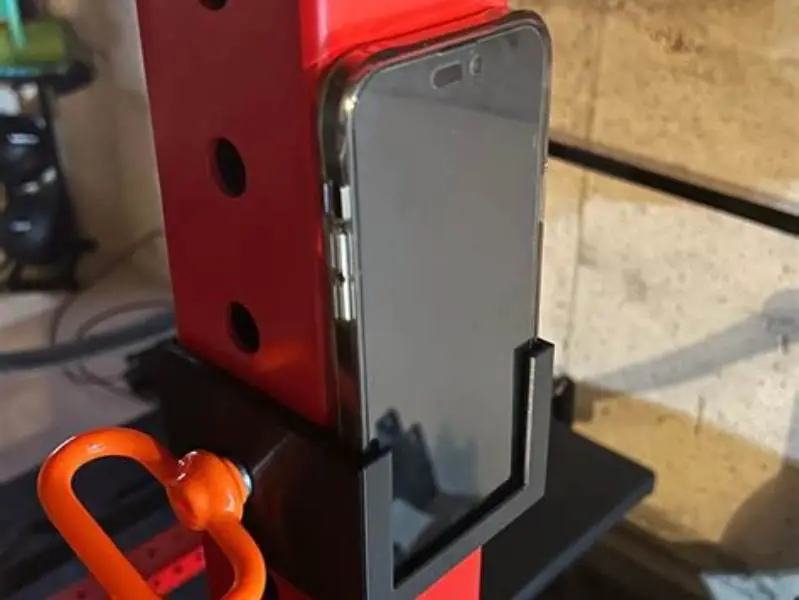
Mount your phone clipped or magnetically attached to the squat rack uprights at about 1.2 to 1.5 meters height, angled slightly upward to capture full squat form without obstruction. Secure mounts with clamps or strong magnets avoid slipping or vibration during lifts.
On this page (8 sections)
- Remember this
- Best phone mounting points around squat racks for filming
- How to secure your phone to avoid slipping or vibration during squats
- Which magnetic or clamp mounts fit common gym equipment for filming
- Angle and height recommendations to capture full squat form clearly
- Where to put phone to film squats with oly bar
- How to avoid common mistakes when filming squats hands-free
- FAQ
Part of our guide on non-rotating mount for gym bar
Fast facts
- Phone height
- 1.2-1.5 m
- Mount type
- Clamp or magnetic
- Rack tubing diameter
- 25-50 mm
- Recording angle
- 10-20° upward
- Phone stability
- Must resist vibration
Remember this
- Mount near rack uprights at 1.2-1.5m height for full squat capture
- Use clamp or magnetic mounts rated for gym equipment diameter
- Angle phone slightly upwards for clear bar and lifter visibility
- Avoid mounting on the bar due to safety and movement
- Secure firmly to prevent slipping or vibration during reps
Best phone mounting points around squat racks for filming
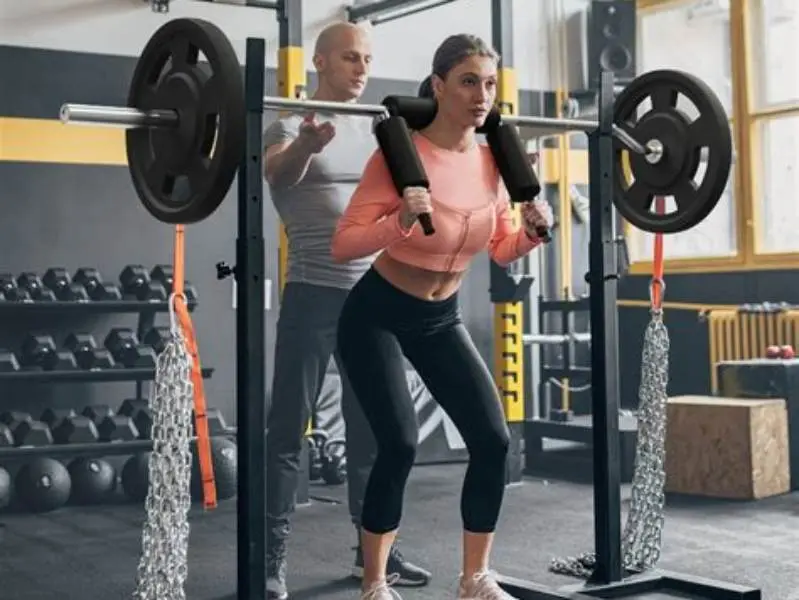
The most stable and practical mounting points for filming squats with an Olympic bar are the vertical uprights of the squat rack. These uprights typically range from 25 mm to 50 mm in diameter and are sturdy enough to hold clamp or magnetic mounts without flex. Position the phone about 1.2 to 1.5 meters off the floor to capture the full squat motion from head to toe without cutting off the bar or feet.
Avoid placing your phone on moving parts, such as the safety bars or the barbell itself, because these shift and vibrate during lifts. Instead, choose fixed, non-moving points on the rack or the surrounding frame. If using a power rack, the side uprights near the center gap provide a direct, unobstructed frontal or side view depending on your filming side.
Another option is the horizontal crossbars or the rack’s top beam, but these are often too high and forced to an awkward angle that might not capture the full range of motion. The preferred height and location maximize both visibility and stability.
| Mounting point | Diameter range mm | Stability | View quality |
|---|---|---|---|
| Vertical uprights | 25-50 | High | Excellent full squat view |
| Horizontal crossbar | 30-40 | Medium | Partial, often too high |
| Safety bars | Variable | Low | Unstable, moves during lifts |
| Olympic bar | 28 | Very low | Unsafe and unstable |
How to secure your phone to avoid slipping or vibration during squats
Avoiding phone movement during squats is crucial for clear video. Clamp mounts with rubberized grips and adjustable tightening are preferred because they firmly hold onto round tubing without scratching or slipping. Choose mounts that fit your rack’s tube diameter and offer at least 10 N·m of tightening torque to resist vibration. We cover phone holder for safety squat bar in its own article.
Magnetic mounts can work well if the rack tubes are steel and you use strong neodymium magnets rated for at least 2 kg pull force. However, phone cases with metal plates must be compatible with your mount magnet type (e.g., MagSafe or Qi2). If the case is thick or incompatible, magnets fail to hold securely.
Never rely on loose hooks, elastic bands, or unstable surfaces. Any movement ruins your footage and risks your phone falling. Test your set-up by lightly bumping the rack to confirm no slipping or shaking.
- Clamp mounts: rubber grips, adjustable tightening to fit 25-50 mm tubes
- Magnetic mounts: use strong neodymium magnets with correct case compatibility
- Avoid: elastic bands, hooks, or resting on unstable surfaces
- Test stability by bumping rack to confirm no phone movement
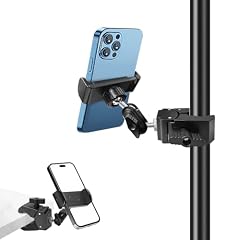
Phone Holder for Mic Stand
Fits poles from 0.47 to 1.1 inches diameter with rubber anti-skid pads and 360° rotation for secure phone mounting on squat rack tubing
Which magnetic or clamp mounts fit common gym equipment for filming
Clamp mounts designed for cycling or photography tripods usually fit typical squat rack tubing with diameters between 25 mm and 50 mm. Models that include adjustable arms and 360-degree rotation let you precisely position your phone. The clamp jaws should open at least 50 mm to fit most rack tubes. For the detail, see our notes on best angles for deadlift filming.
Magnetic mounts specifically marketed for gym or bike use often use neodymium magnets with pull forces between 2 and 5 kg. These mounts work only if your phone case is compatible with magnetic attachment: MagSafe certified for iPhones or metal plate inserts for Android phones. Without this, magnetic holding force drops to unsafe levels.
Some mounts combine clamps with magnetic plates, offering the best grip and flexibility. Always check mount specifications and your phone plus case thickness (usually 7-12 mm) to ensure secure attachment.
In gyms with carbon fiber or plastic-coated racks, clamps are the only reliable option because magnets cannot attach. The other half of this decision is phone setup on gym power rack.
| Mount type | Tube diameter fit mm | Magnet reliance | Rotation adjustability |
|---|---|---|---|
| Clamp mount | 25-50 | No | Yes, usually 360° |
| Magnetic mount | Steel only | Yes, strong magnets | Limited |
| Hybrid clamp+magnet | 25-50 | Yes | Yes, flexible positioning |
Find the exact squat rack spots and mount types that keep your phone steady for perfect hands-free Olympic bar squat videos.
Angle and height recommendations to capture full squat form clearly
Set your phone at approximately 1.2 to 1.5 meters height to include the entire lifter from head to feet while squatting. This height also keeps the Olympic bar within frame. Angling the phone lens upward by about 10 to 20 degrees avoids cutting off feet and captures depth in the squat.
Recording from the front or side provides the best view of form. Front filming shows bar path and knee tracking clearly; side filming reveals squat depth and back angle. Place your mount on the side of the rack opposite your filming angle to minimize interference.
Distance from the squat rack should be about 1.5 to 2.5 meters, depending on your phone’s lens field of view. Wider lenses require less distance, but you risk distortion if too close. Test framing before lifting. Use grid overlays on your camera app if available for better alignment.
If your phone supports it, shoot video at 60 fps or higher to catch fast motion smoothly.
- Height: 1.2-1.5 m for full body and bar visibility
- Angle: tilt lens 10-20° upward to include feet and depth
- Distance: 1.5-2.5 m, adjusted for lens field of view
- Side or front angle preferred, mount opposite filming side
Where to put phone to film squats with oly bar
The best spot to put your phone to film squats using an Olympic bar is clipped or magnetically mounted on one of the squat rack’s vertical uprights about 1.3 meters high, facing the lifter. This placement captures the squat’s entire motion without obstructions or risk of collision with the bar or lifter.
Avoid mounting on or near the bar itself because the bar moves rapidly and can vibrate severely, risking phone damage. Placing the phone on safety catches or spotter arms causes shaky footage due to their movement under load.
For optimal framing, angle the phone slightly upward (about 15°) and sit it 1.5 to 2 meters away from the rack’s centerline. This setup prevents distortion and ensures the bar path and knee tracking are fully visible.
If the rack has crossbars or horizontal braces, these are usually positioned too high or far away to get usable footage. Vertical uprights offer a secure, level, and unobstructed mounting place.
| Mount location | Stability | View quality | Safety |
|---|---|---|---|
| Vertical upright (1.2-1.5 m) | High | Excellent full form | Safe and secure |
| Barbell | Low | Variable, unstable | Unsafe for phone |
| Safety bars | Low | Shaky, partial view | Unsafe movement |
| Crossbars (top) | Medium | Poor framing | Safe but awkward |
How to avoid common mistakes when filming squats hands-free
Many beginners place their phone too low, cutting off feet or bar ends from the video. Always verify framing before you start lifting. Using your phone’s camera grid helps keep the bar centered and feet visible.
Another frequent error is poor mount choice. Elastic bands, resting the phone on unstable surfaces, or using weak magnets cause slipping or vibration. This ruins footage and risks dropping your phone. Invest in a clamp mount designed for gym equipment or a strong magnetic mount compatible with your phone case.
Setting the phone too close or too far impacts image quality. Too close causes wide-angle distortion; too far results in a small, unclear image of your squat form. Adjust distance to fill the frame adequately while maintaining clarity.
Lighting matters. Film where light is even and bright enough to prevent shadows obscuring your form. Avoid filming directly into bright gym lights or windows.
- Check framing height and angle before squatting
- Use appropriate mounts, avoid elastic or loose setups
- Maintain 1.5-2.5 m distance for distortion-free video
- Film in well-lit, evenly illuminated areas
FAQ
Can I mount my phone on the Olympic bar to film squats?
No, mounting on the bar is unsafe. The bar moves and vibrates during lifts, risking your phone’s damage and providing shaky footage.
What height should I set my phone for filming squats?
Set your phone around 1.2 to 1.5 meters high to capture full squat form including bar and feet clearly.
Are magnetic mounts strong enough for gym filming?
Magnetic mounts can work if your phone case supports strong magnets like MagSafe. Otherwise, use clamp mounts to avoid slipping.
How far should my phone be from the squat rack?
Position your phone roughly 1.5 to 2.5 meters from the rack, depending on your lens field of view, to avoid distortion and capture clear video.
Is it better to film squats from the front or side?
Both angles are useful: front shows bar path and knee tracking; side reveals depth and posture. Choose based on what you want to analyze.
Will vibration affect video quality when mounted on the rack?
Yes, vibration can blur video. Use mounts with rubberized grips or strong magnets, and test stability by lightly bumping the rack before recording.