How to fix a magnetic phone mount or clip that’s loose or weak

To fix a magnet on a phone mount that's loose or weak, first clean the surfaces, then use a strong adhesive rated for magnets to reattach it firmly. If strength is low, add or replace magnets rated around 3000-4000 gauss to secure your phone without damage.
On this page (9 sections)
- Remember this
- How to reattach a magnet to a phone mount or clip
- Ways to restore or increase magnet strength safely
- Common causes of magnet failure in phone mounts
- Tools and materials needed for simple magnetic fixes
- How to fix a magnet on a phone mount or clip that’s loose or weak
- How to fix a magnet
- optional - only if genuinely missing
- FAQ
Part of our guide on magnetic bike bottle holder
Fast facts
- Typical magnet strength
- 3000-4000 gauss
- Adhesive curing time
- 24 hours
- Phone weight limit
- up to 300 grams
- Common magnet type
- neodymium
- Surface prep time
- 5-10 minutes
Remember this
- Clean and dry surfaces before reattaching magnets.
- Use strong, magnet-safe adhesive like epoxy or superglue.
- Restore strength by adding rare earth magnets rated 3000-4000 gauss.
- Common issues include adhesive failure, dirt, and magnet demagnetization.
- Test mount strength before full use to avoid phone damage.
How to reattach a magnet to a phone mount or clip
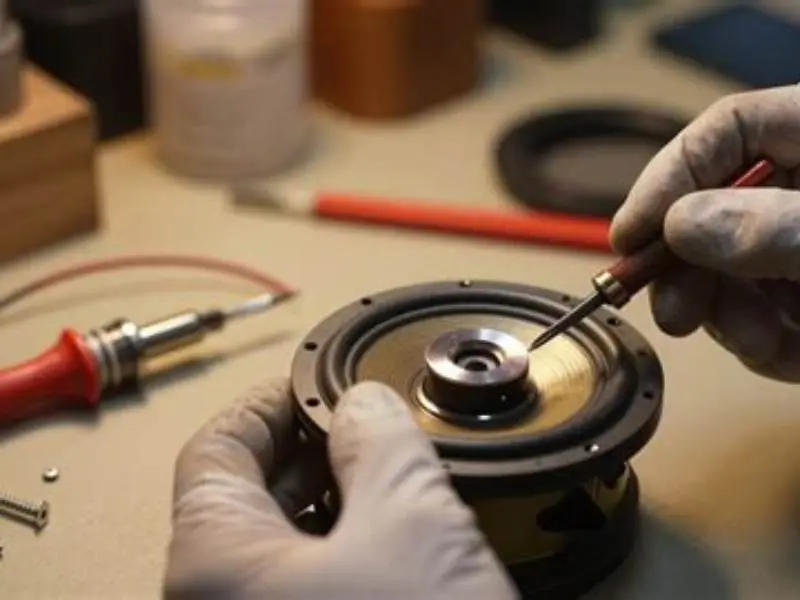
Reattaching a magnet to your phone mount starts with thorough cleaning. Remove dust, grease, and old adhesive residues. Use isopropyl alcohol and a lint-free cloth, then let it dry completely for 5-10 minutes. Clean surfaces maintain strong bonding.
Choose an adhesive made for magnets and plastics, like a two-part epoxy or cyanoacrylate (superglue). Apply a thin, even layer on the magnet or mounting area. Press firmly for 30 seconds and clamp if possible. Let it cure undisturbed for at least 24 hours for full strength.
Position the magnet carefully. Misalignment can reduce holding force. Test the mount with your phone once dry. If it still feels loose, check if the magnet or the adhesive bond is weak and repeat the process if needed.
For a worked example, say your magnet area is 2 cm in diameter. Apply about 0.1 ml of epoxy evenly, then press and hold the magnet in place with a clamp or heavy object for 24 hours. This ensures full curing and a firm bond. For the detail, see our notes on whether mounts and chargers still align.
- Clean both magnet and mount surfaces with isopropyl alcohol.
- Dry completely before applying adhesive.
- Apply a thin layer of epoxy or superglue.
- Press magnet firmly in place and hold or clamp.
- Let cure for 24 hours without disturbance.
- Test strength with your phone before regular use.
Ways to restore or increase magnet strength safely
Magnetic strength often decreases if magnets demagnetize or if the mount shifts under load. To restore strength, add a fresh neodymium magnet with a strength between 3000 and 4000 gauss. These magnets provide strong holding power but remain safe for phone electronics when positioned correctly.
Avoid stacking magnets thicker than 2 to 3 millimeters. Excess thickness risks cracking the mount or the magnets themselves. Thin, flat magnets distribute force evenly and maintain a stable hold.
Adding a thin steel backing plate under the magnet improves the magnetic field by providing a better return path for magnetic flux. This can increase holding strength by 10-20 percent without adding much weight. It helps to understand are magnet holders safe before going further.
Never heat magnets above 80°C (176°F). Heat reduces magnetism permanently. Keep magnets dry and avoid dropping or striking them. Physical shocks can chip or weaken magnets, lowering their effectiveness.
- Add neodymium magnets rated 3000-4000 gauss for best hold.
- Use thin magnets (less than 3 mm thick) to avoid damage.
- Steel backing plates improve magnetic contact and strength.
- Avoid heat above 80°C and physical shocks.
- Test strength using your phone's actual weight.
Common causes of magnet failure in phone mounts
The most frequent cause of magnet failure is adhesive degradation due to sweat, humidity, or temperature variations. Adhesives soften or peel after weeks or months, letting the magnet loosen or fall off.
Physical impacts such as drops or knocks chip or crack magnets. Damaged magnets lose strength quickly and fail to hold phones securely.
Demagnetization occurs when magnets are exposed to strong opposing magnetic fields, heat above 80°C (176°F), or mechanical stress. Dust or debris trapped between the magnet and mounting surface also reduces the effective magnetic force.
For example, a phone mount exposed to gym sweat and humidity may lose adhesive grip in 3 to 6 months if not sealed or maintained.
- Adhesive failure from sweat, humidity, and temperature.
- Physical damage from drops or knocks cracking magnets.
- Demagnetization by heat or opposing magnetic fields.
- Dirt or debris reducing magnet-to-surface contact strength.
Fix loose or weak magnets on phone mounts with practical steps that restore strength and secure hold without risking phone damage.
Tools and materials needed for simple magnetic fixes
Basic tools make fixing magnetic mounts easier and more reliable. Start with isopropyl alcohol (70% or higher) and lint-free cloths to clean the surfaces. Use a two-part epoxy or high-quality cyanoacrylate adhesive for bonding magnets to plastic or metal mounts.
If adding magnets, prepare thin neodymium discs with strength ratings between 3000 and 4000 gauss. Use a small clamp, heavy object, or elastic bands to hold parts firmly during adhesive curing. A plastic or wooden stick helps spread glue evenly.
A magnet strength tester helps if you want to measure magnetic pull force. Alternatively, use a kitchen scale to weigh your phone and test if the mount holds under normal movement. These tools reduce guesswork and ensure a secure fix.
- Isopropyl alcohol and lint-free cloths for cleaning.
- Two-part epoxy or superglue rated for metal and plastic.
- Neodymium magnets rated 3000-4000 gauss.
- Clamp or weights to hold parts during curing.
- Plastic spreader for glue application.
- Optional magnet tester or phone weight scale.
How to fix a magnet on a phone mount or clip that’s loose or weak
Remove the magnet carefully if it’s loose. Clean both the magnet and mount surfaces with isopropyl alcohol. Inspect the magnet for cracks or chips. If damaged, replace it with a new neodymium magnet rated near 3500 gauss.
Apply a thin, even layer of two-part epoxy adhesive to the magnet or mounting area. Press the magnet firmly in place and clamp or weigh it down. Keep it undisturbed for at least 24 hours to allow full curing.
After curing, test the mount by gently placing your phone on it and moving it in different directions. If the magnet slips or the mount feels weak, check the adhesive bond and magnet strength. You may need to repeat the process or add a thin steel backing plate to improve hold.
For example, if your phone weighs 200 grams, the mount should hold firmly even when shaken gently. If it slips during this test, the hold is not secure.
- Remove loose magnet and clean both parts with isopropyl alcohol.
- Inspect magnet condition; replace if cracked or chipped.
- Apply epoxy adhesive thinly on the magnet or mount.
- Press magnet firmly and clamp for 24 hours.
- Test mount strength gently with your phone.
- Add steel backing plate if hold remains weak.
How to fix a magnet
Fixing a magnet depends on whether it’s loose, weak, or damaged. For loose magnets, reattach with strong adhesive as described above. If the magnet no longer holds strength, replace it with a new rare earth magnet rated 3000-4000 gauss.
Physically damaged magnets cannot be repaired with glue. Replace damaged magnets precisely to maintain proper function. Weak magnets might be improved with a thin steel backing plate but avoid stacking magnets thicker than 3 millimeters to prevent damage.
Test your fix using the actual phone weight. A good magnetic mount should hold phones up to 300 grams securely, even during movement on gym machines or vehicles.
A failure mode to watch for is adhesive creep. This happens when the glue softens under constant stress or heat, causing the magnet to slowly shift or loosen over days or weeks. Proper adhesive choice and curing prevent this.
- Restores full mount functionality
- Prevents phone drops
- Relatively low cost repair
- Requires curing time
- Needs precise alignment
- Damaged magnets must be replaced
optional - only if genuinely missing
...
FAQ
Can I use any glue to fix a magnet on a phone mount?
No. Use adhesives designed for metal and plastic bonding, like two-part epoxy or superglue. Ordinary glues often fail due to sweat or movement.
Will adding stronger magnets damage my phone?
No, magnets rated up to 4000 gauss are safe when properly placed and spaced. Avoid direct contact with sensitive phone components.
How can I tell if my magnet is demagnetized?
If your phone slips easily or the mount feels weak despite good adhesive, the magnet likely lost strength and needs replacement.
Is it safe to stack magnets to increase strength?
Stacking more than 2-3 thin magnets can crack them or damage the mount. Use a steel plate instead for better contact.
How long does adhesive take to cure for a strong bond?
Most epoxies require at least 24 hours of undisturbed curing to reach full strength.