How to install a MagSafe ring inside a case for stable mounting

Install the MagSafe ring centered on the case's inside back, aligning it with the phone’s wireless charging coil. Clean surfaces before applying to ensure a firm hold and stable magnetic mounting.
On this page (8 sections)
- Remember this
- Can you put a MagSafe ring inside a phone case
- How to position the MagSafe ring for best magnetic hold
- Compatibility with different phones including Android
- Differences between rings for MagSafe and Qi2
- Tips on cleaning surfaces before installation
- How to install a MagSafe ring inside a case for stable mounting
- FAQ
Part of our guide on testing phone attachment on squat rack
Fast facts
- Ring Diameter
- 28-32 mm
- Magnetic Force
- about 100-110 g/cm²
- Ideal Case Thickness
- < 3 mm
- Charging Speed
- up to 15W with MagSafe
- Installation Time
- 5-10 minutes
Remember this
- Place the ring centered on the wireless charging coil for best hold.
- Clean the case’s inside surface before installation to prevent slipping.
- MagSafe rings work best in thin cases; thick cases reduce magnetic strength.
- MagSafe rings differ from Qi2 rings; compatibility matters for mounts.
- Android phones can hold magnetic rings but charging and mounting vary.
Can you put a MagSafe ring inside a phone case
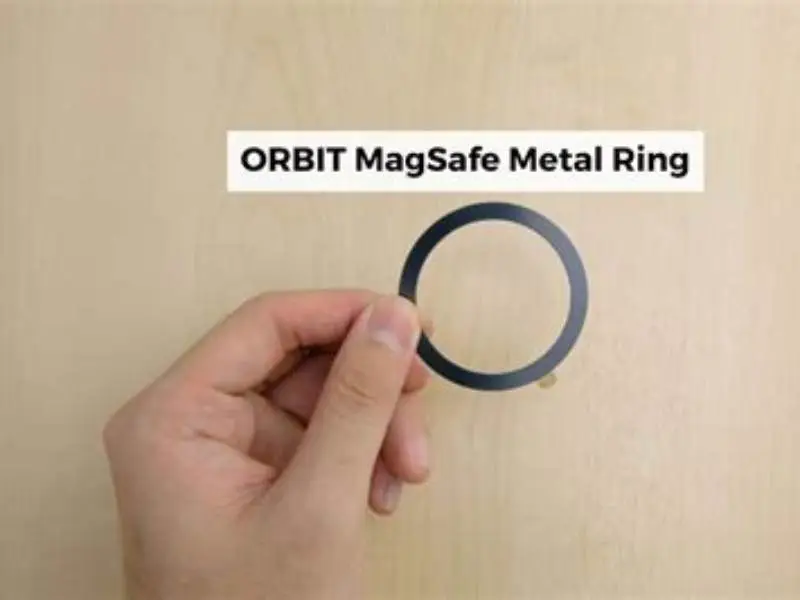
Yes, you can install a MagSafe ring inside most phone cases. The ring fits between the phone and case, allowing a magnetic mount to hold the phone firmly. This setup keeps the phone protected without adding bulk outside.
The crucial factor is case thickness. Thin cases under about three millimeters let the magnetic force pass through effectively. Thicker cases block the magnet and reduce mounting strength.
Rings with adhesive backs work best inside smooth plastic or silicone cases. Textured or fabric cases might cause the ring to shift or peel off. Test the fit before final placement.
On harder cases, the adhesive bond tends to last longer. On flexible cases, surface oils or flexing may weaken adhesion over time. Before you commit to anything, it is worth looking at charging issues with magsafe adapter.
If you plan to use a case with a built-in kickstand or card holder, check if the MagSafe ring still fits flush inside. Bulkier features can cause the ring to sit unevenly, weakening the magnetic grip.
Some users add a thin piece of double-sided tape under the ring for extra thickness and better hold. This can help if the case material is too smooth or slightly uneven, but avoid adding more than 0.5 mm or the ring may misalign with the charging coil.
- Protects ring from scratches
- Keeps phone look clean
- Preserves phone protection
- Reduced magnet strength if case is thick
- Possible adhesive wear on flexible cases
How to position the MagSafe ring for best magnetic hold
Align the ring so its center sits over the phone’s wireless charging coil. For iPhones with MagSafe, the coil centers roughly 25-30 mm from the bottom edge of the back. We cover adhesive mounts inside leather cases in its own article.
If you misalign the ring by more than 5 mm, magnetic hold and charging efficiency drop noticeably. The ring must be centered both horizontally and vertically for stable mounting.
Use a removable tape or a dry run to mark the position before peeling the adhesive. Hold the phone and case together while ensuring the ring lines up with the charging coil.
If access to the phone’s back is limited by case shape, use a ruler or template to find the coil’s location. Confirm by testing magnetic hold before final fixing. We go through magsafe style accessory for android step by step elsewhere on the site.
A quick way to check alignment is to place the phone inside the case without the ring, then place a MagSafe charger on the outside of the case. If it snaps in place magnetically and starts charging, your coil alignment is good.
If your case is clear, you can sometimes see the charging coil outline on the phone’s back to help center the ring. If not, use a small template printed on paper cut to ring size and position it inside the case before final adhesion.
- 1. Clean inside of the case with isopropyl alcohol.
- 2. Locate the charging coil center on the phone back or case.
- 3. Mark the ring center position on the case interior lightly.
- 4. Peel protective layer from ring adhesive.
- 5. Press the ring firmly into place inside the case.
- 6. Let adhesive cure for at least 24 hours before use.

iCloth 70% Isopropyl Alcohol Large Screen and Electronics Wipes
Cleans surfaces effectively with 70% isopropyl alcohol concentration for strong ring adhesion.
Compatibility with different phones including Android
MagSafe rings are designed for iPhones with built-in MagSafe magnets and coils. They deliver strong magnetic hold and fast wireless charging up to 15 watts.
Android phones usually lack integrated magnets in the back. They can hold MagSafe rings but with weaker magnetic force. Charging speed depends on the wireless coil size and Qi standard used.
Some Android models support Qi2, a newer standard that includes magnetic alignment. Qi2 rings differ slightly in shape and magnet positioning from MagSafe rings.
If you want stable mounting on Android, check if your phone supports magnetic accessories or buy a dedicated magnetic plate. MagSafe rings are best for Apple setups but can work with care on Android.
Clear, step-by-step instructions for installing a MagSafe ring inside any phone case to ensure stable hold and wireless charging without guesswork.
Differences between rings for MagSafe and Qi2
MagSafe rings are circular magnets about 28-32 mm in diameter, matching Apple’s MagSafe coil system. They are tuned for iPhone models from 12 upwards.
Qi2 rings comply with the Wireless Power Consortium’s latest Qi2 standard. They have a slightly different shape to optimize magnetic alignment on Qi2-enabled Android phones.
MagSafe rings usually support up to 15W charging with precise alignment, while Qi2 rings are designed for compatibility across multiple brands and may charge slower.
If you mix the two, mounting hold might be unstable or charging efficiency reduced. Use the ring type matched to your phone’s wireless charging standard.
| Feature | MagSafe Rings | Qi2 Rings |
|---|---|---|
| Diameter | 28-32 mm | 30-34 mm |
| Charging compatibility | iPhone MagSafe 12+ | Qi2-enabled Android phones |
| Max charging power | Up to 15W | Up to 12W typical |
| Magnet layout | Circular ring | Slightly oval or offset |
| Mounting strength | Strong with matching case | Moderate, varies by phone |
Tips on cleaning surfaces before installation
For a firm bond, clean the inside of your phone case before applying the MagSafe ring. Residues like dust, oil, or lotion reduce adhesive grip.
Use 70-90% isopropyl alcohol on a lint-free cloth to wipe the case surface. Let it dry fully before sticking the ring.
Avoid household cleaners that leave residues. Do not touch the ring’s adhesive area after peeling the backing.
If your case is fabric or textured, consider using a thin plastic backing to create a smooth surface for the ring.
Keep the ring pressed firmly against the case for 20-30 seconds to maximize contact.
How to install a MagSafe ring inside a case for stable mounting
Start by identifying the phone’s wireless charging coil center. For iPhones, this is near the center of the back glass, about 25-30 mm from the bottom edge.
Clean the case’s inside surface thoroughly with isopropyl alcohol. Let it dry fully to prevent adhesion failure.
Peel the adhesive backing off the MagSafe ring. Align the ring’s center with the coil center mark inside the case.
Press firmly for about 30 seconds, keeping the ring flat without bubbles or edges lifting.
Wait 24 hours before mounting or wireless charging to allow full adhesive cure. Test magnetic hold by placing the phone in your mount.
If the hold is weak, check alignment and case thickness. Thicker or textured cases need repositioning or a different ring.
For outside case installation, follow the same cleaning and positioning steps but expect slightly less protection and possible ring wear.
If you want extra security, apply a small strip of clear tape over the edges of the ring after installation. This helps prevent peeling from case flexing or heat exposure during charging.
After installation, test the ring’s magnetic hold using a compatible mount. If the phone wiggles or detaches easily, remove the ring, clean surfaces again, and reinstall with better alignment or a stronger adhesive.
Some cases with thick camera bumps or uneven backs may require trimming or sanding the case interior slightly to allow the ring to sit flat. This ensures stable mounting without gaps that reduce magnetic strength.
- 1. Mark charging coil center on case back using a ruler or template.
- 2. Clean case’s inside surface with isopropyl alcohol.
- 3. Peel off ring adhesive protection.
- 4. Align ring precisely over coil center.
- 5. Press ring firmly and hold for 30 seconds.
- 6. Let adhesive cure for 24 hours.
- 7. Test magnetic hold on mount before daily use.
FAQ
Can I install a MagSafe ring on a textured or fabric phone case?
Textured or fabric cases reduce adhesive grip and magnetic hold. If needed, add a smooth plastic backing first or choose a thin plastic case for better adhesion.
Will a thick phone case block the magnetic hold of a MagSafe ring?
Yes, cases thicker than about 3 mm significantly reduce magnetic force. Keep cases thin and flexible for reliable magnetic mounting.
Can I use a MagSafe ring with an Android phone?
You can attach a MagSafe ring to an Android phone, but magnetic hold may weaken and wireless charging speed varies. Check your phone’s compatibility with magnetic accessories first.
How do I know the exact location of my phone’s wireless charging coil?
Most smartphones center the coil about 25-30 mm from the bottom middle of the back. Check your phone’s manual or use a wireless charger pad aligned to find the coil center before marking.
What happens if the MagSafe ring shifts after installation?
Shifting usually means poor surface cleaning or incompatible case materials. Reclean the surface, use a new ring with fresh adhesive, and press firmly during installation.