Which Belkin chargers actually work with iPhones and how to check

Belkin wired chargers generally work with iPhones if the cable and power output meet Apple’s specs. Belkin MagSafe and Qi2 wireless chargers work when your iPhone supports MagSafe or Qi charging and your case isn’t too thick or metal. Check compatibility on model specs.
On this page (8 sections)
- Remember this
- Compatibility of Belkin wired chargers with iPhones
- Compatibility of Belkin wireless chargers (including MagSafe and Qi2) with iPhones
- Clarification on Belkin charging cables and car chargers for iPhones
- What to watch for to ensure proper charging with Belkin products
- Do Belkin chargers work with iPhones
- How to test your Belkin charger and phone case compatibility before buying
- FAQ
Part of our guide on testing phone attachment on squat rack
Fast facts
- Wired charging
- Apple-certified cables needed
- MagSafe support
- iPhone 12 and newer
- Qi2 wireless
- iPhone 8 and newer
- Case thickness limit
- ~3 mm max
- Belkin wireless power
- up to 15 W
- Car charger compatibility
- with Lightning cable
Remember this
- Belkin wired chargers must have Apple-certified cables and 5-20W output for iPhones
- MagSafe or Qi2 charging needs iPhone 12 or newer with compatible cases
- Thick or metal cases can block wireless charging magnets
- Check charger specs for MagSafe or Qi compatibility before buying
- Using Apple-certified cables ensures safe, reliable wired charging
Compatibility of Belkin wired chargers with iPhones
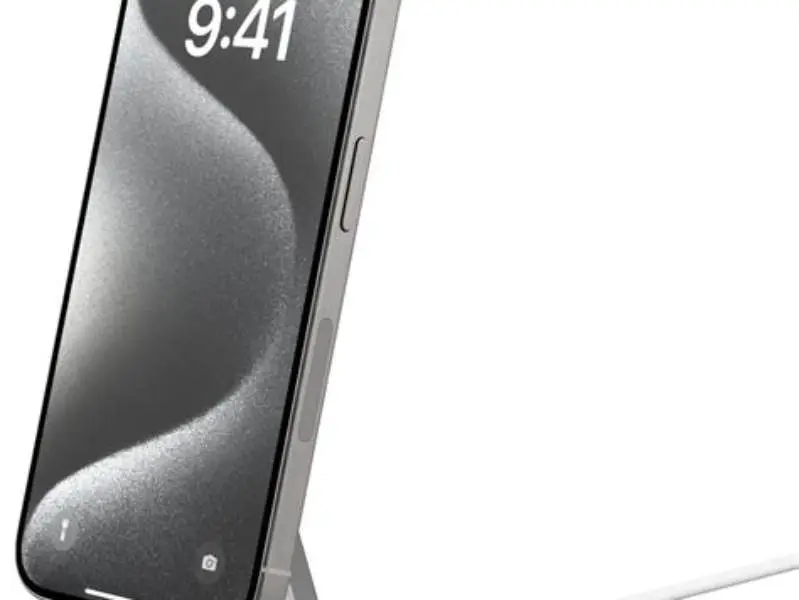
Belkin wired chargers work with iPhones if the cable is Apple MFi-certified and the power output matches iPhone needs, usually between 5 and 20 watts. Higher wattage chargers can speed up charging but only if the iPhone model supports fast charging.
The charger plug itself must supply a stable voltage, normally 5V or 9V for fast charging. Most Belkin wall chargers deliver these voltages under typical conditions. Using a generic or uncertified cable can cause slow charging or error messages on the iPhone screen.
If you already have a Belkin wall charger, check the label for output ratings and ensure your Lightning cable is MFi-certified. Without certified cables, iPhones may refuse to charge or slow down charging to 2.5W or less.
Belkin also offers car chargers compatible with iPhones, but these require a proper Lightning cable to connect. The charging speed depends on the charger's power output and the cable quality. For the detail, see our notes on using a magsafe charger.
Belkin also offers USB-C PD (Power Delivery) chargers that improve charging speed for compatible iPhones. For example, a Belkin 20W USB-C charger paired with an MFi-certified Lightning to USB-C cable can charge an iPhone 13 from 0% to 50% in about 30 minutes. This fast charging is only possible on models starting with iPhone 8 and later.
Some Belkin wired chargers include multiple ports. Charging two devices simultaneously can reduce the power output available to your iPhone. A charger rated for 30W total might deliver only 18W to the iPhone if another device draws power. Check the charger's specifications for multi-port power distribution to avoid slow charging.
| Charger Output | iPhone Charging Speed | Cable requirement |
|---|---|---|
5W (5V, 1A) | Standard charging | Any Lightning cable usually works |
12W-20W (9V) | Fast charging | MFi-certified Lightning cable required |
| Above 20W | No extra speed on iPhone | MFi-certified Lightning cable required |

iPhone Charger 3-Pack 10ft MFi Certified Lightning Cable Fast Charging Cord
Provides Apple MFi-certified Lightning cables ensuring safe and fast charging compatibility with iPhones as stated by MFi certification.
Compatibility of Belkin wireless chargers (including MagSafe and Qi2) with iPhones
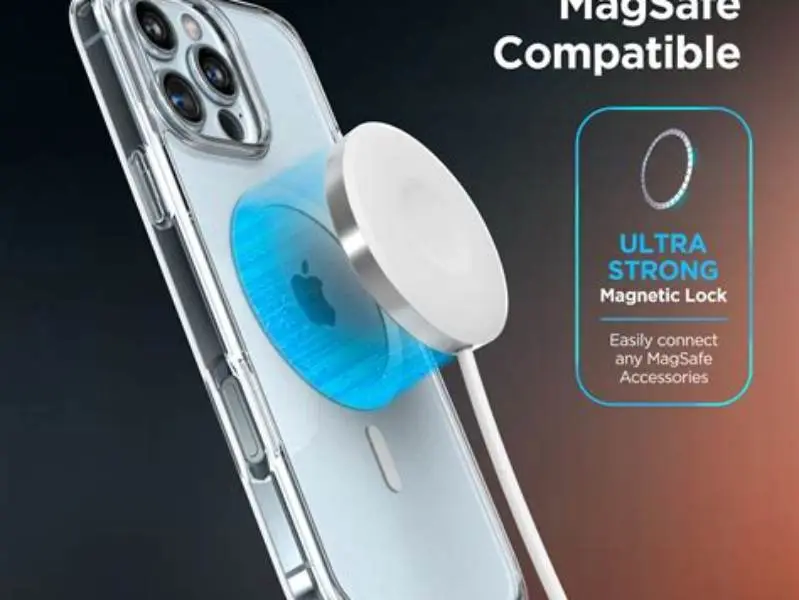
Belkin wireless chargers that use MagSafe technology work properly with iPhones 12 and newer. This is because MagSafe requires a ring of magnets aligned with the phone chassis to hold the charger firmly and deliver power efficiently. People in this spot often ask about magnetic chargers and phone safety as well.
Qi2 wireless chargers from Belkin also charge iPhones starting with the iPhone 8, but without the magnetic alignment. Qi2 supports up to 15 watts of power under ideal conditions, depending on the charger model and power adapter.
Your phone case affects wireless charging. Cases thicker than about 3 millimeters, metal, or containing magnets misaligned with the charger can reduce charging efficiency or prevent it.
For MagSafe chargers, Belkin designs some cases with built-in magnetic rings. When using a generic case, test the magnetic hold by placing the phone on the charger before buying. Weak magnet alignment means slower charging prone to interruptions. For the detail, see our notes on checking magsafe charging with cases.
MagSafe charging happens at a stable 15W with compatible chargers, but Qi2 charging varies between 7.5W and 15W depending on the charger’s capability and case type.
Belkin’s MagSafe chargers include features to prevent overheating. The charger and iPhone communicate to adjust power output if the phone gets too warm, maintaining battery health. This means charging might slow down temporarily in hot environments or if the phone is in a thick case.
Qi2 charging power varies by charger model. Some Belkin Qi2 chargers deliver only 7.5W, which matches the maximum wireless charging speed Apple supports for non-MagSafe devices. Others can reach 15W, but that requires compatible iPhones and slim cases.
A quick example: an iPhone 12 on a Belkin MagSafe charger at 15W can fully charge in about 2.5 hours. The same phone on a 7.5W Qi2 charger might take close to 4 hours. This power difference matters if you need a fast, reliable charge.
| Charger Type | iPhone Compatibility | Max Power | Case restrictions |
|---|---|---|---|
| Belkin MagSafe | iPhone 12 and newer | 15W | Compatible cases or thin non-metal |
| Belkin Qi2 charger | iPhone 8 and newer | 7.5-15W | Thin, non-metal cases best |
| Other Belkin Qi chargers | iPhone 8 and newer | Usually <10W | Minimal metal, thin cases |
Clarification on Belkin charging cables and car chargers for iPhones
Belkin charging cables for iPhones must be Apple MFi-certified to ensure compatibility. Using a non-certified cable risks slow charging or device warnings. These cables usually have Lightning connectors for iPhones and USB-A or USB-C on the other end.
Belkin car chargers often include one or two USB ports. Your iPhone charges only if you use a compatible Lightning cable. Check the car charger's output; 12W per port is common, enough for standard charging but slower than wired fast charging.
Wireless charging car mounts from Belkin use MagSafe or Qi. The phone must be MagSafe-compatible or Qi-compatible and have a case that doesn’t block charging magnets or signals.
Test your charger, cable, and phone setup before relying on it during workouts or rides. A voltmeter or USB power meter can help diagnose slow charging issues by measuring voltage and current.
Discover which Belkin chargers really work with your iPhone and how to avoid buying incompatible accessories.
What to watch for to ensure proper charging with Belkin products
Charging speed and reliability depend on charger output, cable quality, phone compatibility, and the case used. For wired setups, verify the cable is MFi-certified and the charger matches iPhone power needs.
For wireless charging, the phone’s model, case thickness, and material are key. Cases thicker than 3 mm or with metal parts can disrupt wireless charging.
MagSafe chargers require correct magnet alignment; otherwise, your phone may intermittently lose connection or charge slowly. Test by placing your phone on the charger and seeing if it holds firmly.
Always use chargers that specify Apple or iPhone compatibility. Avoid generic or very cheap chargers that may supply unstable voltage or insufficient power, which harms battery health over time.
A USB power meter is a useful tool to test your Belkin charger and cable setup. It measures voltage and current, helping identify if your charger delivers the expected power.
MagSafe chargers from Belkin often include an LED indicator showing charging status. A green light usually means the phone is charging properly, while a red or amber light signals a problem like misalignment or incompatible case material. This visual check helps catch issues early.
Cases with built-in magnets aligned for MagSafe usually guarantee better charging efficiency. Belkin’s official MagSafe-compatible cases maintain the magnetic field strength and ensure the charger locks on firmly, preventing interruptions.
Incorrect cable length and quality can also affect wired charging. Using a Belkin cable longer than 2 meters might introduce voltage drops, reducing charging speed. Stick to cables 1 meter or shorter for best performance.

YEREADW USB C Tester Power Meter
Measures voltage range 4-30V and current range 0-12A, suitable for testing USB-C charging devices including Belkin chargers and iPhones.
Do Belkin chargers work with iPhones
Belkin chargers work well with iPhones when matched properly. Wired Belkin chargers need Apple-certified Lightning cables and output between 5W and 20W. Wireless Belkin chargers use MagSafe or Qi2 to charge iPhones from model 8 up.
MagSafe chargers deliver 15W to iPhone 12 and newer. Qi2 chargers provide 7.5W to 15W for iPhone 8 and newer. Using a thick or metal case or one without compatible magnets blocks charging or weakens magnetic hold.
You can verify compatibility by checking charger specs, testing magnetic hold with your phone and case, and confirming your Lightning cables are MFi-certified. These checks prevent wasted money on incompatible chargers.
The main limitation is case thickness and material on wireless chargers and cable certification on wired chargers. Belkin’s brand name usually means good quality, but always confirm the specs match your iPhone’s charging requirements.
How to test your Belkin charger and phone case compatibility before buying
First, verify your iPhone model supports MagSafe (iPhone 12+) or Qi2 (iPhone 8+). Then check if your phone case is thin (under 3 mm) and not metal or magnetic except for MagSafe-compatible rings.
Next, test magnetic hold between the Belkin MagSafe charger and your phone and case. Place the phone on the charger. If it stays firmly attached with consistent position, it passes the hold test.
For wired chargers, check the cable is Apple MFi-certified. Use a USB power meter to measure voltage and current from your charger and cable. Expect around 5V at 1A for standard, or 9V at 2A for fast charging.
If you have a Belkin car charger, test it with your phone and cable mounted in your vehicle. Ensure the phone charges without warnings and holds securely if wireless.
These tests stop surprises in real-world use. Gym mounts, bike holders, or car setups are only useful if charging is consistent and your phone stays put.
- Confirm iPhone supports MagSafe or Qi2 wireless charging
- Check case thickness and material for wireless compatibility
- Place phone with case on Belkin MagSafe charger to test magnetic hold
- Use Apple MFi-certified Lightning cable with Belkin wired charger
- Measure output with USB power meter for voltage and current
- Test car charger with phone and cable in vehicle mount
Belkin chargers generally support iPhones well but require checking case and cable compatibility first.
FAQ
Can I use any Belkin wireless charger with my iPhone?
No. Only Belkin chargers that support MagSafe or Qi2 wireless charging work reliably with iPhones. Older Qi-only chargers may charge slowly or not at all depending on your iPhone model and case.
Will a thick or metal phone case damage wireless charging with Belkin chargers?
Thick cases (over about 3 millimeters) or metal components usually block wireless charging or magnet alignment, reducing power transfer or causing the phone to stop charging.
Do Belkin car chargers come with Lightning cables for iPhones?
Typically no. You must use your own Apple-certified Lightning cable to connect the iPhone. The charging speed and reliability depend on cable quality and charger power output.
How can I tell if my Belkin wired charger is good for my iPhone?
Check the charger's output voltage and current on its label, and ensure your Lightning cable is Apple MFi-certified. A USB power meter can verify the actual power delivered.
Is MagSafe charging faster than Qi charging on Belkin chargers?
Yes. MagSafe chargers typically deliver a stable 15W charging speed to compatible iPhones, whereas Qi charging usually maxes out at 7.5W to 15W depending on the charger model and phone.