Which USB-C power meter accurately reads 100W from your power bank

Choose a USB-C meter rated for at least 5A and 100W continuous operation. Use a 5A e-marked cable and a load capable of requesting 100W. At 20V, 5A equals 100W, but your bank, cable, meter, and load must negotiate that profile together.
On this page (9 sections)
- Remember this
- Meter ratings: match continuous limits to the bank
- USB PD versions: separate charging profiles from connectors
- E-markers: identify the cable before testing
- Test procedure: use a controlled load for repeatable results
- Readings: judge the negotiated contract, not watts alone
- Product examples: verify specifications before buying
- Pitfalls: isolate one variable at a time
- FAQ
Part of our guide on satechi power bank for iphone 15 pro max
Fast facts
- 100W relationship
- 20V × 5A
- Meter rating
- At least 5A / 100W continuous
- Cable above 3A
- 5A e-marked USB-C cable
- Useful display
- Voltage, current, and watts
- Controlled test
- Programmable USB-C electronic load
- Primary reference
- USB-IF USB Power Delivery specifications
Remember this
- USB Power Delivery uses voltage and current profiles. A 20V, 5A contract equals 100W.
- A 5A cable needs an electronically marked cable, or e-marker, recognised during USB-C negotiation.
- PD 3.0, PPS, USB4, and Thunderbolt describe different parts of the system. Check the device specifications.
- A programmable USB-C load tester gives a repeatable result. A laptop gives a useful real-world check.
- Treat display accuracy, thermal limits, and voltage drop as meter-specific. Read the datasheet before buying.
Meter ratings: match continuous limits to the bank
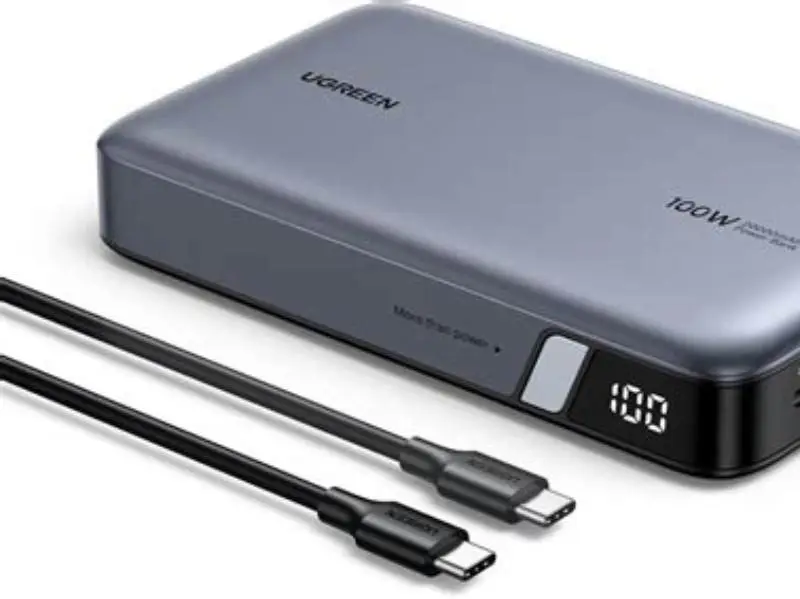
An inline USB-C meter measures voltage and current between the source and load. Multiply those readings for input power at the meter. Its current, voltage, connector, and thermal ratings all matter.
Many inexpensive inline USB-C meters are sold with 3A or 60W ratings. Check the product specification before buying. A meter rated below the bank's negotiated output can limit the test, heat up, or report a value below the source's capability.
Some meters list a peak wattage without specifying continuous handling. Check the datasheet for continuous and thermal limits. If the listing omits them, treat the peak figure as unsuitable for a sustained 100W test.
Prefer meters with higher resolution. A 0.01A display is useful near the current limit, but check the actual display precision in the product specification or independent reviews. Display resolution is not the same as measurement accuracy. We go through overhead rig phone clamp for treadmill filming step by step elsewhere on the site.
- Current rating: at least 5A continuous for a 20V, 100W test.
- Power rating: at least 100W continuous, with thermal conditions stated.
- Display: voltage and current together, plus watts if available.
- Connectors: USB-C input and output rated for the advertised current.
- Documentation: published accuracy, temperature range, and continuous limits.
- A suitable rating reduces clipping risk
- Live voltage and current show the negotiated contract
- Published limits make the result easier to judge
- Small meters often provide limited calibration data
- Peak ratings do not prove continuous handling
- Some displays show resolution without accuracy figures
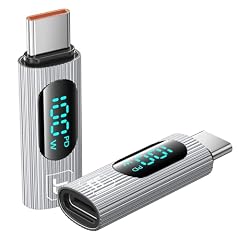
2Pack 100W USB C Female to Male Extension Adapter
Handles your 100 W power bank and shows real-time wattage so you can confirm the bank is delivering 100 W (stated 100W).
USB PD versions: separate charging profiles from connectors
USB Power Delivery 2.0 and 3.0 define power negotiation over USB-C. The familiar fixed profiles include 5V, 9V, 15V, and 20V. A 20V, 5A contract equals 100W under the USB PD power relationship. See the USB-IF specifications at https://www.usb.org/document-library/usb-power-delivery.
PD 3.0 added richer capability reporting and optional features such as Programmable Power Supply, or PPS. PPS lets a compatible source and device request smaller voltage steps within an approved range. A PPS phone can therefore show a voltage other than the fixed profiles without indicating a fault.
PD 2.0 and PD 3.0 are not identical feature sets, but a meter does not turn one into the other. It only observes the negotiated voltage and current. Check both devices' specifications if you need PPS or another optional feature. It helps to understand how to open oneplus power bank before going further.
USB4 and Thunderbolt describe data and system capabilities, not a guaranteed 100W charging contract. USB4 devices can support USB PD, while Thunderbolt systems can have their own charging limits. A USB4 or Thunderbolt cable must still carry the required USB-C power capability.
- PD 2.0 and PD 3.0: fixed power profiles with different optional features.
- PPS: adjustable voltage negotiation for compatible source and load.
- USB4: data and protocol requirements, not an automatic 100W guarantee.
- Thunderbolt: connector and data ecosystem with device-specific charging limits.
- Prevents confusion between charging and data standards
- Explains readings that do not match fixed 5V, 9V, 15V, or 20V values
- Helps you choose a meter for PPS testing
- Feature names vary between product listings
- USB4 and Thunderbolt labels do not guarantee charging power
E-markers: identify the cable before testing
An e-marker is an electronically marked cable chip. USB-IF specifications define how a compliant USB-C cable reports its capabilities during negotiation. A cable intended for currents above 3A needs the appropriate electronic marking.
Look for a stated 5A rating and e-marker wording in the manufacturer's specification. A printed 5A mark on a plug is useful, but it is not proof by itself. USB-IF certified product listings provide a stronger check at https://www.usb.org/products. For the detail, see our notes on find a sturdy tripod base.
Cable length, conductor size, connector quality, and temperature affect voltage drop. A good inline meter typically introduces only a small voltage drop. Check the product specification for measured voltage drop or internal resistance rather than assuming a fixed value.
Use a short cable with a stated 5A rating. Test the cable alone with the same source, meter, and load. A current ceiling near 3A points to the cable, source profile, load, or meter. It does not identify the fault by itself.
- Find the manufacturer's stated 5A capability.
- Look for e-marker information, not only a 5A label.
- Use USB-IF product listings when certification matters.
- Keep the test cable short and inspect both USB-C plugs.
- Cable checks prevent false bank failures
- Short cables make voltage-drop checks easier
- USB-IF listings add a verifiable source
- Some listings omit e-marker details
- Cable markings are not always consistent
- A cable can pass current yet fail another USB-C requirement
A meter can show a number while hiding the limit that produced it. Test the whole USB-C chain.
Test procedure: use a controlled load for repeatable results
A laptop gives a practical test, but its charging demand changes with battery state, processor load, and temperature. A programmable USB-C electronic load gives better control. Choose a model rated above 20V and 5A, with over-temperature protection and a current limit you can set safely.
Connect the meter between the bank and load. Confirm the load's input voltage range before enabling it. Start at a low current, then increase gradually while watching voltage, current, temperature, and the load's protection status.
Set the load to request the bank's advertised profile. For a nominal 100W check, use a 20V contract and increase toward 5A only if the source and equipment ratings allow it. Stop if the voltage collapses, connectors become hot, or the load reports a protection event.
Wait until the meter reading has stabilised, often tens of seconds. Consult the meter and power bank behaviour, then record readings at 30 seconds and 60 seconds. Repeat the test after cooling if thermal protection changes the result.
- Confirm the bank's USB-C output rating.
- Confirm the meter and load continuous ratings.
- Connect the bank, meter, cable, and electronic load.
- Request the target PD profile at a low current.
- Increase current gradually toward the advertised limit.
- Record voltage, current, temperature, and elapsed time.
- Repeat after cooling and compare the readings.
- Current and duration are repeatable
- Thermal behaviour becomes easier to compare
- A controlled load avoids guessing from phone charging
- A suitable load tester costs more than a basic meter
- Incorrect settings can damage equipment
- Some loads do not support every PD or PPS mode
Readings: judge the negotiated contract, not watts alone
A meter showing about 20V and about 5A indicates a 100W-class contract at that moment. Record both values and the test duration. USB-IF specifications define the power relationship, but they do not make every bank deliver exactly 100W under every condition.
Do not treat 19.8V to 20.2V or 4.9A to 5.1A as universal pass limits. Those figures need a cited device tolerance or measurement specification. Use the bank's published limits and the meter's stated accuracy instead. If neither is published, report the observed values without inventing a tolerance.
A reading near 20V and 3A equals about 60W. Possible causes include a 3A cable, a source that offers only 3A, a load that requested 60W, or a protection limit. Change one part at a time.
A lower voltage can be correct. PPS devices can request adjustable voltage, while a phone or laptop may choose 9V or 15V. The meter records the contract; it does not decide whether the device should request more.
| Voltage | Current | Calculated power | Possible interpretation |
|---|---|---|---|
| 20V | 5.0A | 100W | 100W-class contract, subject to stated tolerances |
| 20V | 3.0A | 60W | 3A limit, 60W request, or protection limit |
| 15V | 3.0A | 45W | Lower fixed profile or device request |
| 9V | 3.0A | 27W | Lower fixed profile or device request |
| PPS value | Displayed current | Multiply readings | Adjustable contract; check source and load specifications |
- Separate readings expose current limits
- Time and temperature reveal thermal changes
- PPS readings are easier to interpret correctly
- Meter accuracy can limit the conclusion
- A load may request less than the bank can supply
- Power-bank protection can change output over time
Product examples: verify specifications before buying
Product listings change, so check the current datasheet before purchase. The AVHzY CT-3 is a commonly listed USB-C trigger and tester with PD-related testing functions. Its seller documentation should be checked for the exact current and continuous-power limits of the version offered.
Power-Z KM003C is another example of a USB-C power meter and protocol tester. Its manufacturer or seller documentation lists supported measurements and protocols. Verify whether the specific unit supports the PD and PPS functions you need.
A basic AVHzY CT-2 or similar USB-C meter may suit lower-power checks, but do not assume it is suitable for a sustained 100W load. Compare its stated continuous current, connector rating, accuracy, and thermal limits with the bank.
These examples are starting points, not endorsements. Search the model number on the manufacturer's site, then compare the datasheet with independent test results. Avoid listings that state only a peak wattage.
- AVHzY CT-3: check the current model's continuous USB-C limits.
- Power-Z KM003C: check protocol support and load-test limits.
- AVHzY CT-2: verify its rating before any 100W test.
- USB-IF product database: https://www.usb.org/products.
- Named models give you a starting comparison
- Datasheets reveal limits hidden by marketplace titles
- Protocol testers can show negotiated PD features
- Revisions can change specifications
- Seller claims may differ from manufacturer data
- Protocol testing is not the same as calibrated power measurement
Pitfalls: isolate one variable at a time
A phone may request below 50W, while a laptop can request up to 100W depending on its model, battery state, and workload. Check the device specification or use a load tester to confirm. A phone test cannot prove the bank's maximum output.
Hubs, docks, and adapters add another negotiation and another current limit. Remove them during the test. Measure directly from the bank through the meter, cable, and load.
Heat can change results. Compare readings at the same elapsed times and note connector temperature. A falling output may reflect bank protection, load protection, cable heating, or meter limits.
Change one component per retest. Swap the cable first, then the load, then the meter. This procedure gives you evidence instead of an anecdote.
- Device demand varies widely. Check its specifications.
- Remove hubs and extensions during diagnosis.
- Record readings at fixed times.
- Stop if any connector or cable becomes unusually hot.
- Change one part per retest.
- One-variable tests identify faults faster
- Temperature notes expose protection behaviour
- Direct connections reduce negotiation confusion
- Real devices change their power demand
- Thermal testing takes time
- Some faults require calibrated equipment
Choose a meter with a documented 5A and 100W continuous rating, then test it with a 5A e-marked cable and controlled load. Report the measured voltage, current, time, and temperature.
FAQ
Can I use a 60W meter on a 100W power bank?
It may connect, but it cannot validate a sustained 100W output. Use a meter with a stated continuous rating of at least 5A and 100W, then check its thermal and accuracy specifications.
Why does my meter show 20V but only 3A?
Possible causes include a 3A cable, a source limit, a load request, or protection behaviour. Check the cable's e-marker specification, then test with a controlled load and change one part at a time.
Will my phone pull 100W from the bank?
Not necessarily. Phone, tablet, and laptop charging power varies widely. Check the device specification or use a programmable load if you need to test the bank's maximum.
How long should I leave the meter connected?
Wait until the reading stabilises, often tens of seconds. Record values at 30 and 60 seconds, then compare temperature and output. Follow the meter and bank instructions.
Does the meter itself waste power?
Yes, an inline meter introduces some resistance. The amount depends on its design and current. Check the product specification for measured voltage drop or internal resistance instead of assuming a fixed figure.